Shopware 6 is the shop system. The ERP is the backbone. Systems like PlentyONE, Xentral or SAP supply the product data, stock levels and order information, and Shopware makes them visible to the customer. Product data, stock levels, orders and shipping information flow between the two, ideally in real time, error-free and in both directions. In practice, this connection is often the most critical point in the whole e-commerce setup.
The good news: Shopware 6 was built API-first from the ground up. That means every function of the system is reachable through a cleanly documented REST API. The bad news: API-first does not mean the integration is automatically easy. The architecture decision you make at the start determines how much technical debt you carry in two years.
This article compares the three integration approaches side by side, and shows why on the Thomas Philipps project we took a route that did not exist like this before.
ERP integration in Shopware 6
Architecture, options, and what really works in practice.
Why ERP integrations so often fail
Most ERP integration projects do not fail because of the technology. They fail because of wrong assumptions in the planning phase. The three most common:
"The ERP can export everything we need."
"We sync once a day, that is enough."
"The connector app from the App Store solves that."
The three integration approaches compared, using PlentyONE & Shopware 6 as an example
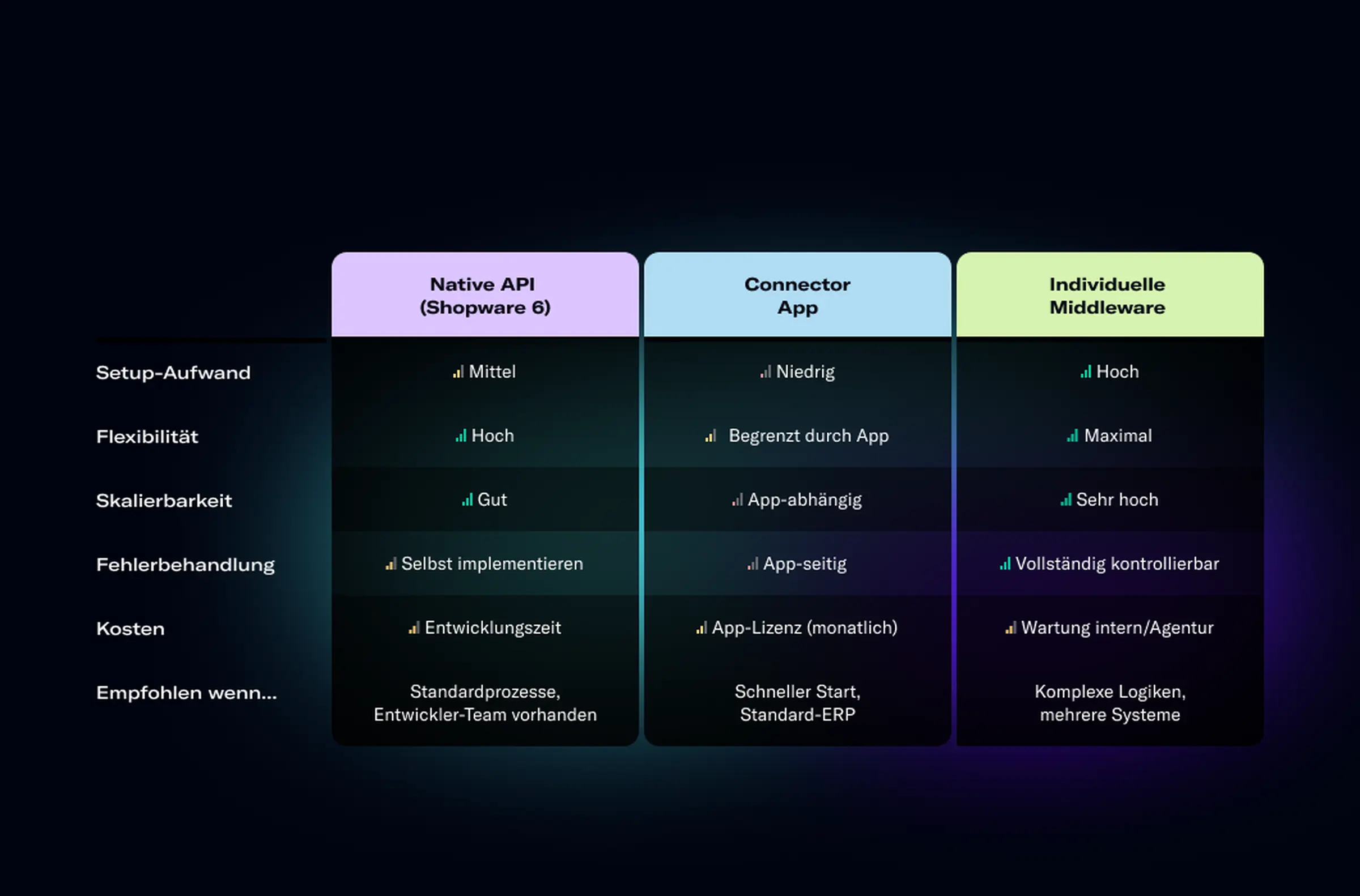
Native Shopware 6 REST API
Shopware 6 provides a complete REST API for products, categories, orders, customers, stock levels and more. Your ERP system talks directly to this API, with no layer in between.
This works well if your ERP system has a mature API of its own and your development team knows both systems. The upside: full control, no app license costs, maximum flexibility in the data mapping logic. The downside: the initial development effort is high, and every Shopware major update has to be checked for API changes.
Connector app from the Shopware App Store
For common ERP systems such as Xentral, Sage, Lexware or DATEV, ready-made connector apps exist in the Shopware App Store. Setup takes hours instead of weeks, with monthly license fees instead of a large development budget.
PlentyONE is an especially strong connector solution if you plan multichannel commerce: the native integration syncs not only Shopware but also Amazon, eBay, Zalando and other channels through one central ERP. That is the sweet spot for merchants who run their Shopware shop as one of several sales channels.
The limits show as soon as the business logic deviates from the standard: customer-specific B2B pricing, individual catalogs per customer group or, as in the following example, connecting several ERP systems at once. Then a connector is no longer enough.
Custom middleware
A middleware is a standalone software layer between Shopware 6 and the ERP. It handles data transformation, error handling, logging and retry logic. It is not part of Shopware and not part of the ERP; it is the translator between the two.
This approach takes more effort to build and needs long-term maintenance. But it is the only one that works reliably when several ERP systems have to be connected at once, when the data logic of the systems is fundamentally different, or when the company wants to integrate more systems in the coming years.
From practice: Thomas Philipps, two ERP systems, one middleware, one shop
Thomas Philipps is one of the best-known retail companies in the German-speaking region, with thousands of items and a complex system landscape that has grown over decades. When the company wanted to relaunch its online shop on Shopware 6, we faced a challenge for which there was no ready-made solution in the App Store.
The starting point: Xentral was to be used as the ERP system for the digital division, but it had to stay in sync with the parent company's legacy ERP system at the same time. Two ERP systems with different data models, different update cycles and different owners. In between: Shopware 6 as the frontend, which had to use both as a data source.
Our approach: we built a custom middleware that acts as the single source of truth between all three systems. The middleware handles data transformation, prioritizes in case of conflicts between the two ERP systems, and makes sure Shopware 6 always sees a consistent state, regardless of which ERP is currently running an update process.
ONEDOT proactively suggested many things, so that we as a company could learn from their expertise and implement things together. For topics that could not be covered technically by the standard, good and cost-acceptable solutions were found quickly.
Lena Rahe
E-commerce project manager, Thomas Philipps

The result: time-controlled special offers, smart upselling rules and experience worlds in the frontend, built on a technical foundation that keeps both ERP systems in sync in real time. What is complex behind the scenes is invisible in the frontend: users get a fast, consistent shop.
Design & technology as one
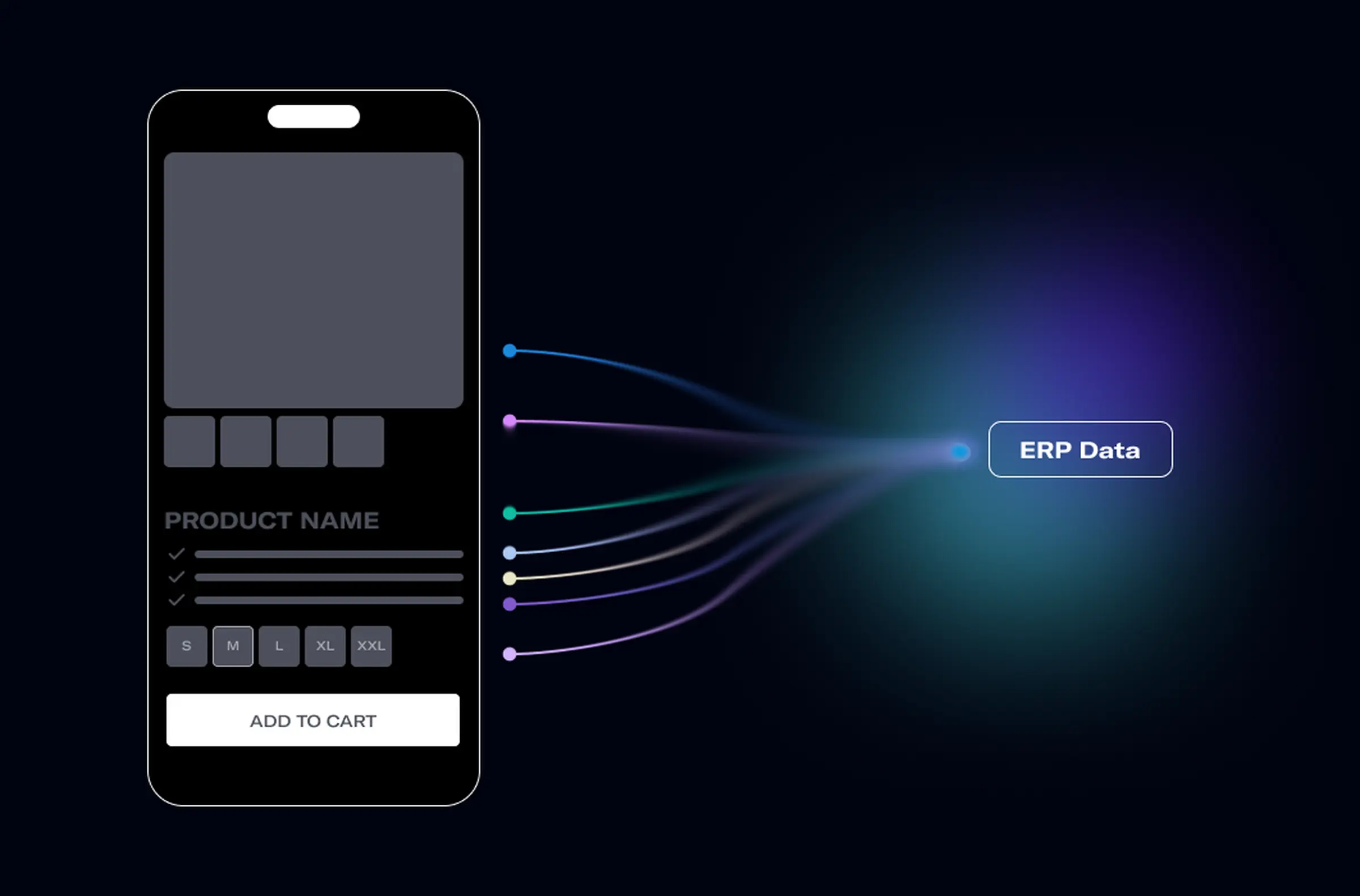
An often overlooked aspect of ERP integrations: the data quality from the ERP is directly visible in the frontend. Missing product images, inconsistent attribute names, incomplete descriptions: all of it comes from the ERP and lands in the shop unfiltered. That is why, on the Thomas Philipps project, we built a component-based design system in Figma alongside the middleware development, with components explicitly linked to the ERP data fields. Every UI component knows which data it needs and shows a defined fallback when that data is missing. That is the difference between a shop that looks randomly put together and a shop that feels consistent.
What really matters in the architecture
No matter which integration approach you choose, these four principles determine whether the integration stays stable in the long run:
Real time vs. batch, decide deliberately: Not every data point needs real-time sync. Product descriptions can sync once a day. Stock levels cannot. Define explicitly for each data type which latency is acceptable.
Error handling from day 1: Every integration will hit a failure at some point: an ERP update changes a data format, a timeout interrupts a sync. Build in retry logic, alerting and a logging dashboard before you go live.
A staging environment is mandatory: ERP updates must be testable in a staging environment before they touch the production integration. That sounds obvious, but in practice it is regularly skipped.
Documentation as a deliverable: The integration is only as good as its documentation. If the development team changes, a new team must be able to understand the architecture in two hours. This applies especially to custom middleware solutions.
Clean data, consistent design: why the two belong together
A working design system in Shopware 6 rests on a principle that comes straight from the component architecture: every UI component is defined once, with color variables as design tokens, typography scales and spacing rules, and then reused across the whole shop. In Figma, these tokens are defined as variables and translated directly into SCSS variables of the Shopware theme.
What that has to do with your ERP integration: if the product data from the ERP is incomplete or inconsistent, the design system logic breaks at exactly those points. A product without a main image, an item without a short description, a category without metadata: these are not design problems, they are data problems. So the ERP integration and the design system have to be planned together from the start.
When does it make sense to bring in an agency?
Not every ERP integration needs outside help. If your ERP is a standard system, your processes are largely fixed and a connector app in the App Store covers your use case, set up the app, configure it and go live.
An agency makes sense if at least one of these applies:
You have more than one ERP system or plan a migration between systems.
Your pricing logic is complex: customer-specific prices, tiered prices, B2B terms.
You plan international expansion with several Shopware sales channels.
The integration is meant to be combined with a shop relaunch or a platform migration.
Your development team knows Shopware 6 but not the ERP's API architecture, or the other way around.
FAQ: ERP integration in Shopware 6
Shopware 5 used a plugin-based architecture with proprietary interfaces. Shopware 6 was built API-first from the ground up: all system functions are reachable through a complete REST API documented to the OpenAPI standard. That makes ERP integrations cleaner in principle, but it also requires the ERP itself to be API-capable.
Yes. PlentyONE (formerly PlentyMarkets) is one of the best-integrated ERP systems for Shopware 6. The native interface syncs items, variants, stock levels, orders and shipping data. Especially strong: PlentyONE brings extensive multichannel capabilities out of the box, so you can manage Shopware, Amazon, eBay and other channels centrally through PlentyONE. For standard processes it is one of the most reliable connector solutions on the market. If you need complex B2B pricing logic, customer-specific catalogs or cross-system integrations, an extended architecture is the better choice. We are happy to advise you.
That depends entirely on the architecture you choose. A connector app from the App Store typically costs 50–200 euros per month plus setup time. A custom middleware starts at 15,000 euros depending on complexity and can be well above that for enterprise setups with several systems. The more relevant yardstick: what does a setup that does not work cost you each month in stock errors, returns and manual effort?
A connector app integration can be live in 1–2 weeks. A custom middleware typically takes 6–16 weeks, depending on the complexity of the data models, the ERP's API quality and the testing effort. In combined shop relaunch projects, integration development runs in parallel with the design and frontend work.

Planning an ERP integration in Shopware 6?
We analyze your system landscape and show you in a free 30-minute call which architecture fits your setup, with no vendor bias.
Read more about the partnership with Shopware in the conversation with Shopware.
Insights that keep us involved and inspired.
View all insights